Outlines
An outline is the drawn shape of a bike's frame, fork, shock and other parts around its linkage. The Bike view draws your linkage inside a full bike: frame tubes, fork, shock, headset cups, stem and bar, saddle, seatpost and brake rotors. The outline is a drawing only. Nothing on this page changes a kinematic result.
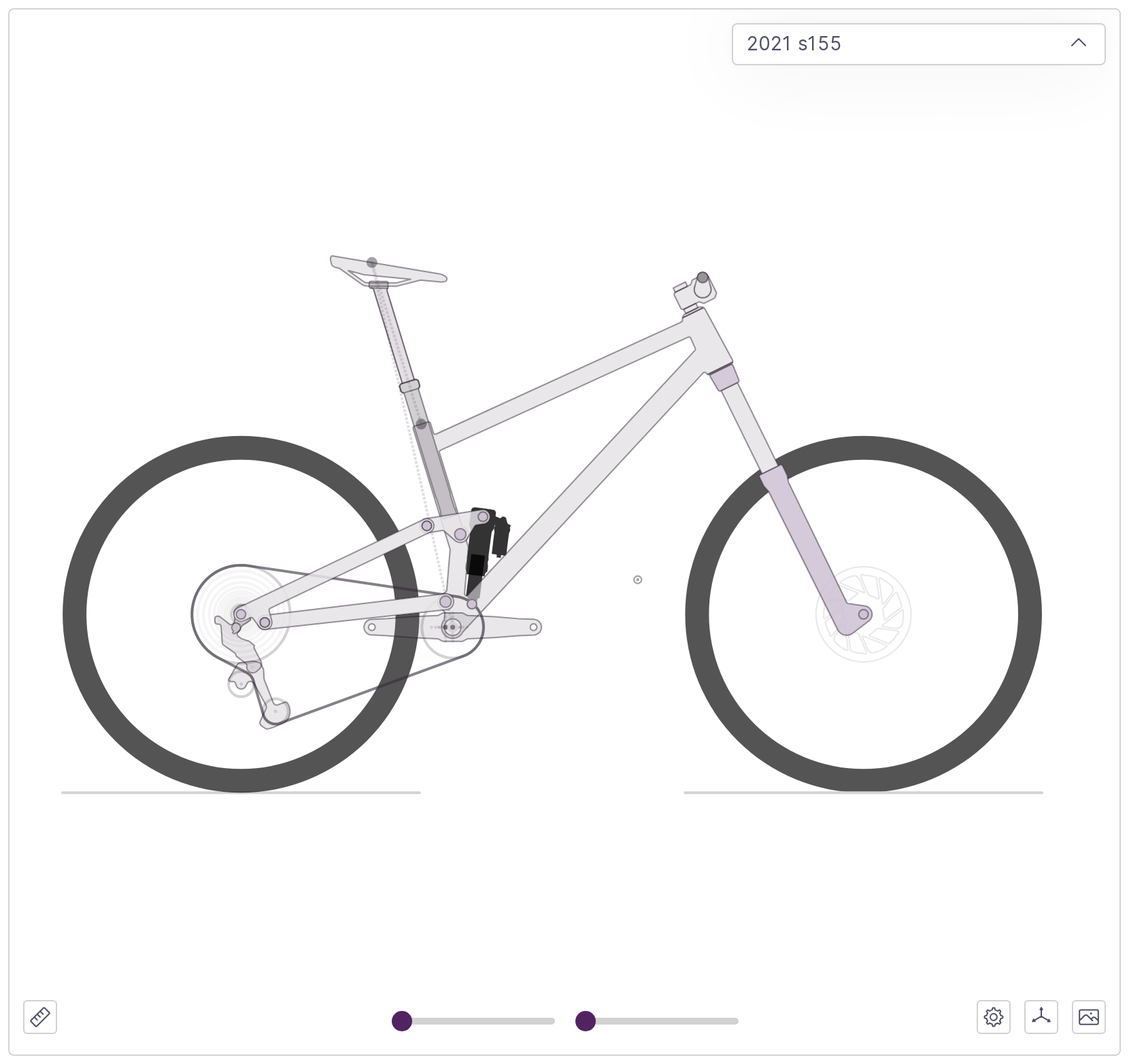
No setup is needed. A bike with no outline settings is drawn with default tube sizes, a generic shock and a 200 mm rotor.
The Outlines Tab
The Outlines tab in the left sidebar has four sections: Components, Seatpost, Tube Dimensions and Pivot Diameters. The Seatpost section has its own page, Dropper Posts.
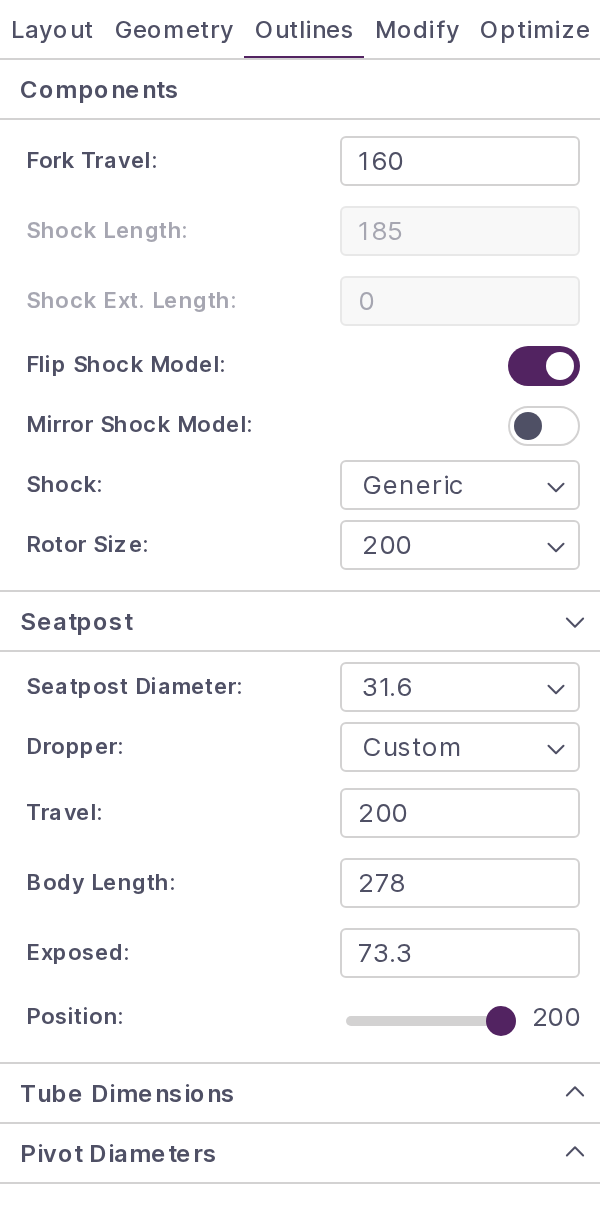
A value outside the allowed range is not applied. The field shows a message underneath and the drawing keeps the last valid value.
Outline Components
| Field | What it controls |
|---|---|
| Fork Travel: | Fork travel in mm. It decides which fork is drawn and is the same value as Fork Travel: under Fork and Shock Info in the Layout tab. |
| Shock Length: and Shock Ext. Length: | Read-only here. Change them under Fork and Shock Info. |
| Flip Shock Model: | Swaps which end of the shock the body sits on. |
| Mirror Shock Model: | Mirrors the shock drawing about its own axis. |
| Shock: | The shock that is drawn, see Shock Models. |
| Rotor Size: | 140, 160, 180, 200 or 220 mm, used for both wheels. The default is 200. |
The two shock toggles are also at the bottom of Fork and Shock Info.
How the Fork Is Drawn
The fork is placed from Fork Length and Fork Offset in the Geometry tab. Fork Travel: picks the chassis:
| Fork travel | Fork drawn |
|---|---|
| Under 120 mm | 32 mm stanchions |
| 120 mm to under 140 mm | 34 mm stanchions |
| 140 mm to under 160 mm | 36 mm stanchions |
| 160 mm to under 200 mm | 38 mm stanchions |
| 200 mm and over | 38 mm dual crown |
A dual crown fork is drawn with a direct mount stem and no upper headset cup.
Shock Models
Shock: starts on Generic, a plain body and shaft. The other choices:
| Brand | Model | Years |
|---|---|---|
| Fox | Float X2 | 2025–27 |
| Fox | Float X2 Parallel | 2025–27 |
| Fox | Float X | 2022–27 |
| Fox | Float X Neo | 2025–27 |
| Fox | DHX2 | 2025–27 |
| Fox | DHX2 | 2021–25 |
| Fox | DHX2 Parallel | 2025–27 |
| Fox | DHX | 2022–27 |
| Fox | DHX Neo | 2025–27 |
| RockShox | Vivid Coil | 2027 |
| RockShox | Vivid Air | 2024–26 |
| RockShox | Deluxe | 2023–26 |
| RockShox | Super Deluxe | 2023–26 |
| RockShox | Super Deluxe Coil | 2023–26 |
- The mount follows the shock length: 165, 185, 205 or 225 mm draws the trunnion version (mounted at the body end by a trunnion head instead of an eye), any other length the standard mount.
- The generic shock is drawn for a Parallel model on a trunnion length, and for any bike with Uses Pull Shock: turned on.
- If a model is drawn the wrong way around, turn it with Flip Shock Model: and Mirror Shock Model:.
Headset Cups
The cups come from the Geometry tab: Lower Headset Stack and Upper Headset Stack, set per size. A stack of 0 draws no cup.
The stem, bar and saddle are drawn from the same table: Stem Length, Stem Spacer, Bar Rise and Nominal Saddle Height.
Tube Dimensions
Each of the three main tubes has an outer diameter at both ends, in mm, and tapers between them. Each value must be above 0.
| Field | Default |
|---|---|
| Top Tube Front: | 35 |
| Top Tube Rear: | 35 |
| Down Tube Front: | 45 |
| Down Tube Rear: | 45 |
| Seat Tube Bottom: | 38 |
| Seat Tube Top: | 38 |
The seat tube stays at least 2 mm wider than the seatpost: 32.9 mm for a 30.9 post, 33.6 mm for 31.6 and 36.9 mm for 34.9. A smaller value is raised to that minimum, and so is a seat tube made too narrow by a larger Seatpost Diameter:.
Pivot Diameters
Each drawn pivot has a diameter field in mm, named after the linkage point. The smallest value accepted is 10 mm.
An empty field uses the default, shown as grey placeholder text: 35 mm for the bottom bracket, 24 mm for a pivot where a link mounts on the frame, 20 mm for the other pivots (shock mounts included) and 14 mm for the ends of a DAQ sensor.
Shape the Frame
Bend and move the top tube, down tube and seat tube directly on the plot. Round handles appear when the pointer is near the front triangle.
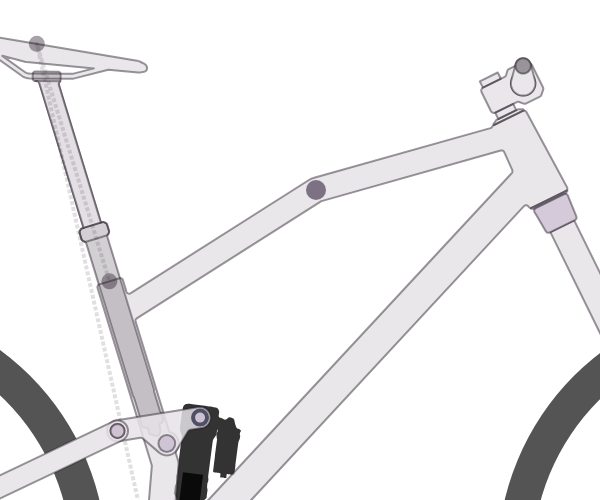
| To do this | Do this |
|---|---|
| Add a bend to the top tube or down tube | Double-click the tube. Each tube takes up to 5 bends. |
| Move a bend | Drag its handle. |
| Remove a bend | Double-click its handle. |
| Move where the top tube meets the seat tube | Drag the handle at that joint. It slides along the seat tube. |
| Move where the top tube or down tube meets the head tube | Drag the handle at that joint. It slides along the head tube. |
| Change where the seat tube bends | Drag the handle on the seat tube. The tube keeps a straight run at the top for the seatpost. |
| Put a joint or the seat tube bend back | Double-click its handle. |
The down tube starts with one bend near the bottom bracket. Each change is its own undo step (Ctrl+Z). The shape belongs to the size on screen, so each size can be shaped separately.
Look Up a Fork
The fork lookup fills in a fork's axle to crown length and offset from a list of production forks.
- Open the Geometry tab and click the search icon at the end of the Fork Length row (Look up a fork). The expanded geometry table has the same icon.
- In the Fork Lookup window choose Brand, Model, Years, Wheel and Travel.
- If the fork was made with more than one offset, choose one under Offset.
- Check the Axle to Crown value and click Apply to All Sizes.
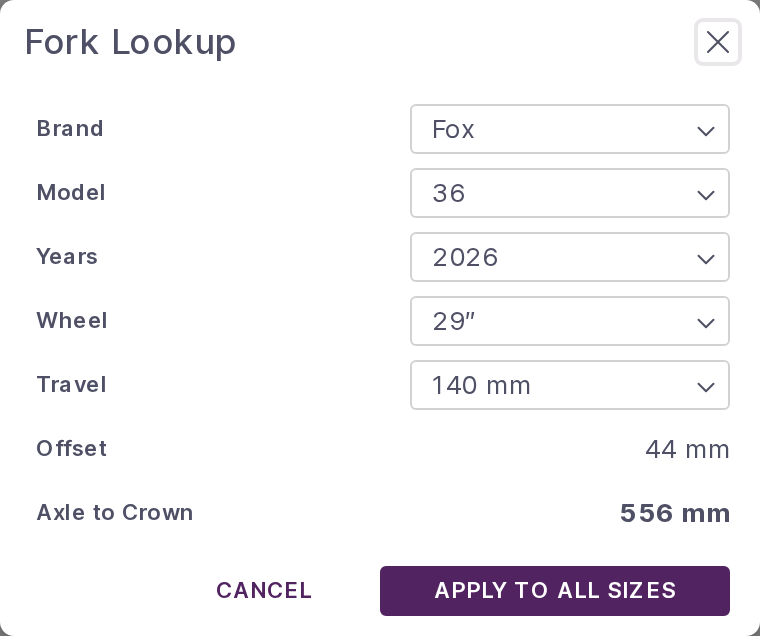
The brands listed are Cane Creek, EXT, Formula, Fox, Intend, Manitou, Marzocchi, Ohlins, RockShox and SR Suntour.
Offset depends on what the maker publishes for that fork:
- A single offset is shown as plain text.
- Several offsets become a list. While it reads Pick an offset, Apply to All Sizes stays disabled.
- Where no offset is published the row reads Not published, left unchanged, and applying changes the fork length only.
Apply to All Sizes writes Fork Length and Fork Offset to every size of the bike in one undo step.
Note
The lookup does not change Fork Travel:. Set it yourself in the Outlines tab or under Fork and Shock Info, otherwise the fork is still drawn for the old travel.
Sizes and What Is Saved
All of the outline settings are saved with the bike.
Shared by every size:
- Fork travel
- Shock model, Flip Shock Model: and Mirror Shock Model:
- Rotor size
- Tube dimensions
- Pivot diameters
- Seatpost diameter and dropper model
Set for each size:
- Tube bends
- Where the tubes meet the head tube and seat tube
- Where the seat tube bends
- Dropper travel, body length, exposed length and position
Everything else follows the geometry of the size on screen: wheel sizes, fork length and offset, headset stacks, stem, bar and saddle height. Change the size with Switch Size at the bottom of the Geometry tab or with Frame Size: in the drivetrain menu.
Show and Hide Parts
Two buttons at the bottom right of the Bike view control what is drawn. The choices are saved with your account and apply to every bike you open.
- The gear-shaped button (Show drivetrain settings) has Show Seatpost and Show Brake Rotors under Display:. The rear rotor is drawn only when the largest cog is 36T or smaller. Drivetrain covers the rest of the menu.
- The plot settings button (Show plot settings) has Wireframe Mode under Additional Display Settings:, which replaces the outline with plain lines between the linkage points.